Create a Smartform
This page shows how to start a Smartform from your own system with POST /Integrations/dialog/json. The call creates a form with your values filled in, and you can send the link to a person or show it in a MyPage.
Every call needs a bearer token from a Standard API client. See Authentication.
Find the Smartform id
A Smartform is identified with a dialogDefinitionId. You can read it from the URL of the Smartform in Studio, as shown below.
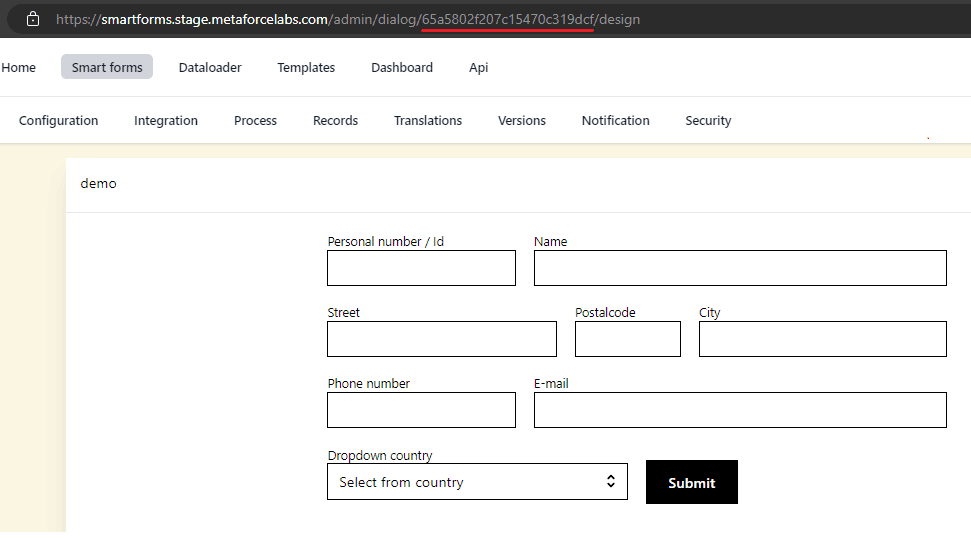
Find the property names
Every field in a Smartform has a property name. You use these names in values. To list them for a Smartform, call:
GET https://api.smartforms.metaforce.net/Integrations/{dialogDefinitionId}/fieldsThe response is a list with the id, name and type of each field. To find the ids of the participating parties of a multi-step Smartform, see Participating parties.
Create the form
POST https://api.smartforms.metaforce.net/Integrations/dialog/jsonThe body needs two fields. A request without them is answered with 400.
| Field | What it is |
|---|---|
dialogDefinitionId | The id of the Smartform. |
values | The values to fill in, by property name. See Value shapes. |
The response holds the new form:
| Field | What it is |
|---|---|
id | The id of the form that was created. |
dialogDefinitionId | The id of the Smartform. |
processSteps | For a multi-step Smartform, a summary of each step. |
resolvedEnvironment, versionKey | The environment and version that ran when you named an environment. Otherwise null. |
By inserting dialogDefinitionId and id into this URL you can open the form:
URL template: https://smartforms.metaforce.net/dialog/{dialogId}/form/{formId}
Environment
By default the call uses the current saved version of the Smartform. To run the version deployed to an environment, name it in the body or in the path:
POST https://api.smartforms.metaforce.net/Integrations/dialog/json
{ "dialogDefinitionId": "...", "environment": "Test", "values": { } }

POST https://api.smartforms.metaforce.net/Test/Integrations/dialog/json- The values are
Development,Test,PreProductionandProduction, in any case. - A Smartform that is not deployed to that environment is answered with
404. - Naming one environment in the path and another in the body is answered with
400. The same environment in both places is accepted. - The form is filed under that environment. When you later read it back or create its PDF with an environment in the path, Doc Gen checks that the form belongs to it.
Other calls that accept the environment in the path are listed on PDF and Read and delete forms.
Prefilled values
This example shows how you can create a smartform from JavaScript with some prefilled values: name, age, city and country.
const axios = require('axios').default;

async function main() {
  var client_id = 'ex_e0JBQ0I3NTQyLUE1NzgtNDI0Ni05Oxxxxxxxxxxxxxxxxxxx';
  var client_secret = 'ezMzMjA2MTU5LTRGNTktNDM5Mi04Mxxxxxxxxxxxxxxxxxx';
  var idDialogId = '646f4127f70bcxxxxxxxxxxx';

  var scope = 'api.external';
  var authHeader = 'Basic ' + Buffer.from(client_id + ':' + client_secret).toString('base64');
  const options =
  {
      method: 'POST',
      url: 'https://identity-v2.metaforce.net/connect/token',
      headers: { 'content-type': 'application/x-www-form-urlencoded', 'Authorization': authHeader },
      data: 'grant_type=client_credentials&scope=' + scope
  };

  try {
      var response = await axios.request(options);
      axios.defaults.headers.common['Authorization'] = `Bearer ${response.data.access_token}`;

      const request =
          {
              method: 'POST',
              url: 'https://api.smartforms.metaforce.net/Integrations/dialog/json',
              headers: { 'content-type': 'application/json' },
              data: {
                  dialogDefinitionId: idDialogId,
                  values:
                  {
                       'name' : 'Jon',
                       'age' : '39',
                       'city' : 'Stockholm',
                       'country' : 'Sweden'
                  }
              }
          };

      const res = await axios(request);
      console.log(res.data.id);
  } catch (err) {
      console.log(err)
  }
}

main();
Value shapes
values is a JSON object. Doc Gen matches each name to the property name of a field.
- Nested objects. A nested object is flattened with an underscore.
{ "address": { "city": "Oslo" } }fills the field with the property nameaddress_city. SetpropertyMergeStringto use another separator than_. - Field settings. Add a suffix to a property name to set something other than the value:
.labelchanges the label of a text or signature field, and on a date picker.minDate,.maxDateand.specificDayset the allowed dates. You can send the options of a dropdown or radio list under the plain name or undername.options. - Dropdown and radio list options. Send the options as a JSON array of
displayandvaluepairs:
"values": {
    "department": [
        { "display": "Sales", "value": "sales" },
        { "display": "Support", "value": "support" }
    ]
}- Repeating rows. If a row in the Smartform repeats and has a variable name, send an array under that name, one object per row:
"values": {
    "travellers": [
        { "name": "Ingrid Berg", "city": "Bergen" },
        { "name": "Ola Dahl", "city": "Trondheim" }
    ]
}- Order table.
orderTableValuefills an order table withvat,discount,sumandrows, a list of strings. - Map.
mapValuesfills a map with acenterLocationand a list oflocations. Each location hastitle,address,latitudeandlongitude. - Images. See Images in a Smartform.
Other request fields
| Field | What it does |
|---|---|
source | Where the form came from. The default is integration. |
privateSecret | A secret that goes with the form when it is sent to participating parties. If you leave it out, Doc Gen uses a default value. |
propertyMergeString | The separator for nested values. The default is _. |
notification | Sends the form to people. See Participating parties. |
dataTableValue, externalMetaData, webhook, skipRuleEngine, textLibraryFolder | See External data. |
To get a PDF instead of a link, see PDF.