Calling the Pages API
Every Pages call has the same shape: an address that names the environment, a bearer token, and a JSON body. This page describes those common parts once, so the other Pages pages can stay short.
The Pages API is served from api.webeditor.metaforce.net. A call looks like this:
curl -X POST "https://api.webeditor.metaforce.net/Test/pdf/create" \
-H "Authorization: Bearer <access token>" \
-H "Content-Type: application/json" \
-d @request.json
The path
Every path starts with the Doc Gen environment the call is for.
/{customerEnvironment}/...{customerEnvironment} is one of these values:
| Value | Use |
|---|---|
Development | Development |
Test | Test |
Test1, Test2, Test3, Test4, Test5 | Extra test environments |
IntegrationTest | Integration test |
AcceptanceTest | Acceptance test |
Production | Production |
Every path can also end with an optional environment group name or id:
/{customerEnvironment}/.../{environmentGroupNameOrId}Add it only when extra Environment Groups have been added to your setup in Pages Manager. The other Pages pages leave this segment
out of their paths. The status search (GET /{customerEnvironment}/status) is the one exception: there the environment group goes in the
query parameter environmentGroupNameOrId.
Authentication
All public endpoints need a bearer token in the Authorization header. How to get a token is described in
Authentication. A missing or invalid token gives 401. When your environment is set up to require a scope
and the token does not have it, the call gives 400 with error (022).
Request bodies
The calls that create a document take the same core fields:
| Field | Required | Meaning |
|---|---|---|
MetaFile | Yes | The name of the logic file. |
Document | Yes | The document template inside the logic file. |
DataAsBase64 | Yes | The XML or JSON data, encoded as a base64 string. Use the jsondata variant of the endpoint when the data is JSON. |
AttributeStoreKey | No | A key in the CenterPoint Attribute Store. Pages fetches the stored metadata and merges it with your data. |
Source | No | The name of the calling system in Statistics. When it is empty, Statistics uses the name of the logic file. |
Attachments | No | A list of attachments. See On-demand documents. |
Each page adds the fields that belong to its calls.
Response codes
| Code | Meaning |
|---|---|
| 200 | The call succeeded. Document calls return the file. |
| 202 | The distribution request was accepted. The document is handled after the call returns. |
| 204 | The data should not produce a document. This is a normal outcome, not an error: the logic file decided that nothing is to be created. |
| 400 | The request could not be used, for example a bad base64 string, a value over a limit or a missing setting. The body is JSON with a Message field whose text starts with a code such as (011). See Error codes. A body that leaves out a required field gets the missing fields listed in errors instead. |
| 401 / 403 | No valid token, or no access. |
| 404 | The document instance or distribution was not found, for example after it was deleted. |
| 406 | The data cannot be produced because something is missing in the logic file, or the distribution failed. The body holds a Message. |
| 429 | Too many requests. See the next section. |
| 500 | An internal error, or a connection that Pages depends on failed. The body holds a Message. |
Rate limits
Pages limits how many calls a company can make per second and per minute, so that one caller cannot overload an environment. These calls are limited:
- Creating a PDF from XML data (
pdf/createandpdf/simplex/create) and every MFDX call. On-demand documents marks them in its table. - Every call under
distribute/. See Distribution and post processing. - Creating a Dynamo document from XML or JSON data (
dynamo/createanddynamo/create/jsondata).
Pages counts the limited calls together, per company, environment and environment group. A Dynamo call is checked against the Dynamo limit, and the other calls against the document limit. Production allows twice the number of calls that the other environments do.
The limits are deployment settings and can differ between installations. When you go over a limit, the call returns 429 with a
JSON body that has an Error field (TooManyRequestsPerSecond or TooManyRequestsPerMinute) and a Message field. Wait a moment and
send the call again. For batch jobs, slow the sending down instead of retrying at once.
Limits on size
Pages also limits how big a generated document and its attachments can be. See Limitations.
The API reference
Every public endpoint, with its fields and responses, is in the API reference at https://webeditor.metaforce.net/documentation-api.
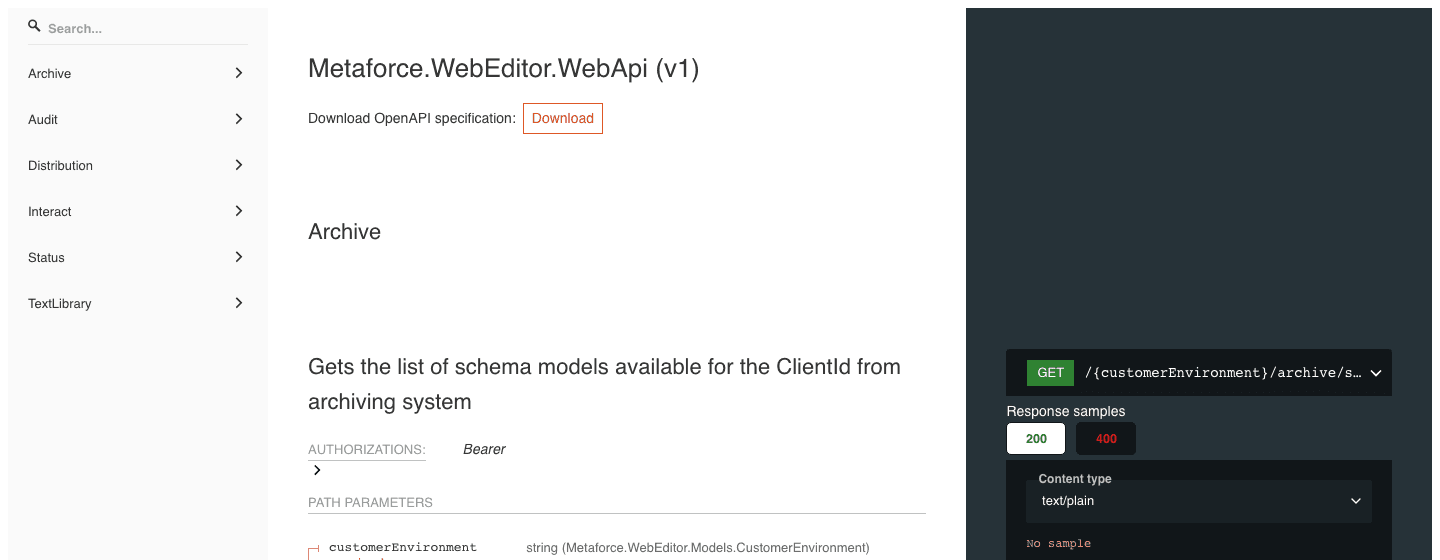
The reference groups the endpoints in the menu on the left:
- Archive: see Archive.
- Distribution: see Distribution and post processing.
- Interact: document creation, Editor instances, Dynamo, attachments and template information. See Editor integration, On-demand documents and Template information.
- Status: see Editor integration.
- Audit and TextLibrary: used by the Pages Editor itself. Your system does not call them.
Click Download under the title to get the OpenAPI specification. Import it into Postman or another API tool to try the calls.
Client applications written in .NET can use the NuGet package Metaforce.WebEditor.Api.Client.