Follow up on signing orders
The Digital Signing tab in View lists the signing orders you have started from the Signature application, so you can follow them without leaving Dialogs. You create a new order in Signature. Signing needs a signature provider that your administrator has set up.
Open Digital Signing
- On the Dialogs home page, click View.
- The Processes page opens on the Digital Signing tab.
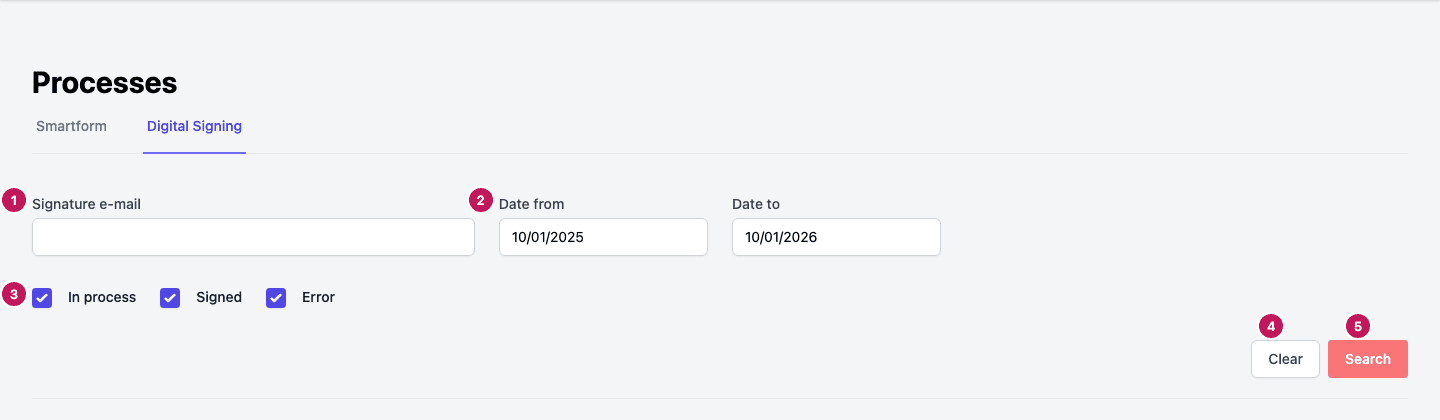
Filters
- Signature e-mail finds orders where one of the signers has that e-mail address.
- Date from and Date to limit the list to a period. They start as the last year, ending today.
- In process, Signed and Error are ticked when the page opens. Untick a box and click Search to hide those orders. Error also covers orders that were rejected or canceled.
- Clear resets the filters.
- Search shows the orders that match the filters. No orders found means nothing matched.
Read the list
Each order has a row with its Name, Number of files, Size, Created by, Number of signatures, Date, Provider and Status. Click the arrow at the start of a row to see the e-mail addresses of its signers.
The status of an order is one of:
| Status | Meaning |
|---|---|
| In Progress | The order is started and waits for the signers |
| Completed | The order is finished |
| Rejected | The order was rejected |
| Canceled | The order was stopped |
| Error | The order failed |
With some signature providers, each signer also shows a status of their own, such as In Progress, Started, Completed, Rejected, Expired, Forwarded or Canceled, and a download button for a signer who has signed.
Actions on an order
Open the menu at the end of a row to choose an action.
| Action | When it is available |
|---|---|
| Stop signing order | Until the order is completed or canceled. Dialogs stops the order at once, without asking again, and shows Order canceled successfully |
| View Signed PDF | When the order is Completed and the signed files are available |
| Download All files | When the order is Completed and the signed files are available |