Editor
The Editor is a web editor for finishing a document before it is published and sent. Your system creates the document from a template and its data, and the person who owns it opens a link to the Editor, fills in what is missing, chooses texts, adds attachments and then publishes or discards the document. This section describes what that person sees and does, and what a developer needs to embed the Editor in another application.
This Editor is separate from the Doc Composer in SmartForms. It works on documents created through Pages. Editor integration shows how a document gets to the Editor, and Pages Manager holds the settings that decide which functions the Editor shows.
How it works
The editor saves your work automatically, about a second after you stop typing. While it saves, the top bar turns light grey. A document stays a draft until you publish or discard it.
The screen
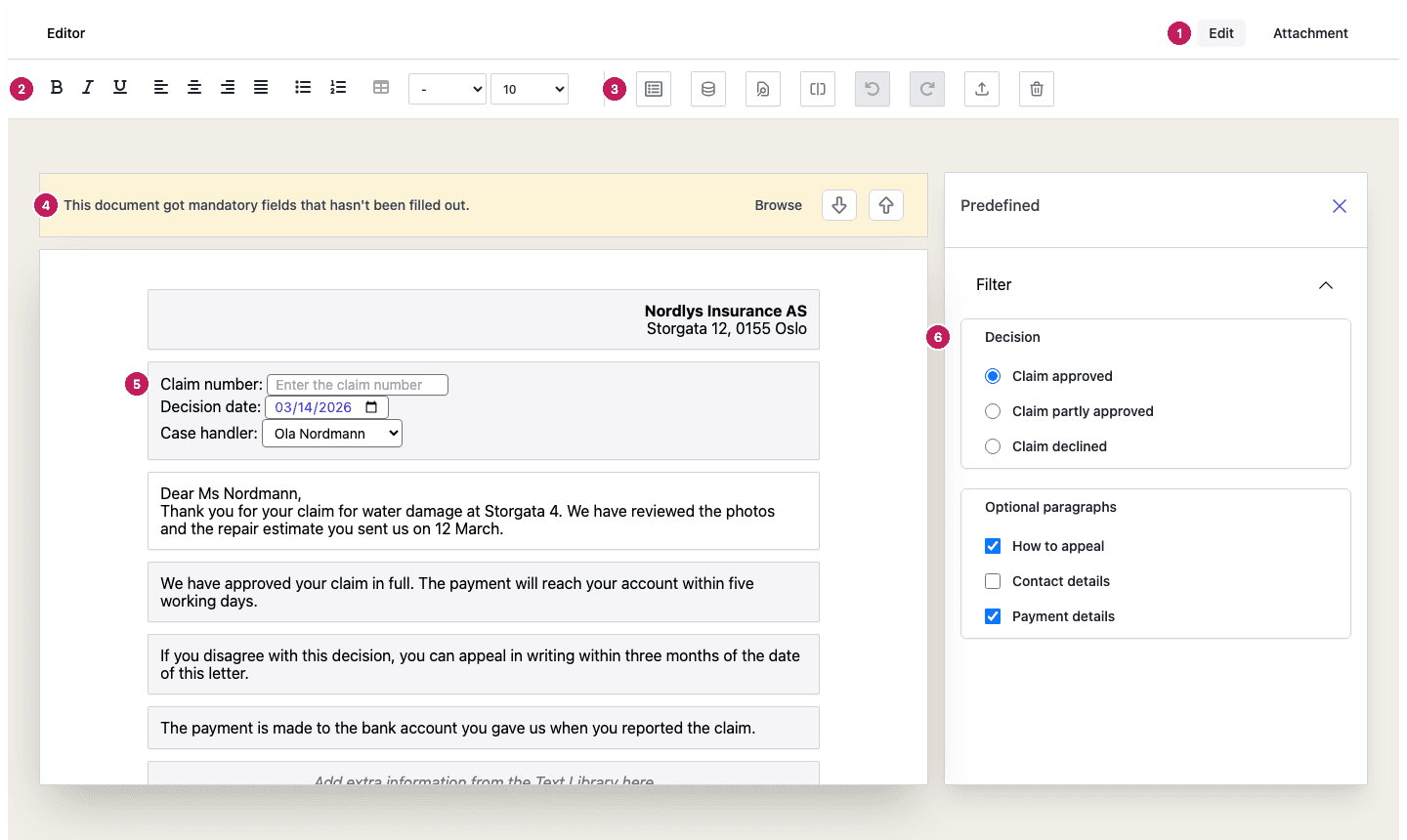
- Edit and Attachment switch between the document and its PDF attachments. The number next to Attachment counts the attachments that are included.
- The formatting toolbar works on the text you are typing in. See Text, fields and layout.
- The buttons to the right of the toolbar open the side panels, the preview, publish and discard. They show only icons. Point at a button to see its name. See Preview, publish and discard.
- A yellow banner tells you that required fields are still empty.
- The document. Text you can change has a white background, and text that is fixed by the template is grey. Fields sit inside the text.
- The side panel shows the Predefined texts you can switch on and off, or the Library. See Predefined texts and Text Library.
On a narrow screen, such as a phone, the formatting toolbar keeps Bold, Italic and Underline and moves the rest into a menu behind an ellipsis button, More options. The buttons to its right move into a second More options menu, and the side panel opens over the document instead of beside it.
What you can do in the Editor
| Task | Where |
|---|---|
| Change text, fill in fields, format text, add page breaks | Text, fields and layout |
| Choose between prepared paragraphs | Predefined texts |
| Add standard wording from the Text Library | Text Library |
| Attach PDF files, from your computer or a library | PDF attachments |
| Check the result, publish, discard | Preview, publish and discard |
| Build the Editor into your own application | Embed the editor |
Document status
Every document has one of four statuses.
| Status | Meaning |
|---|---|
| Draft | The document is being edited. |
| OK | The document is published and ready to be delivered. You can no longer change it. |
| Discarded | The document was abandoned and should not be delivered. You can no longer change it. |
| Deleted | The document has been removed. |
Language
The Editor is available in English, Norwegian and Swedish. It uses the Preferred Language set for
the environment in Pages Manager.
To show it in another language, add ?lng= and a language code to the address of the Editor: en
for English, nb for Norwegian or sv for Swedish.
How long a document is kept
The Editor keeps a document for five days after it was created, by default, and then removes it, whatever its status. If a document is still a draft when it is removed and it was started with a callback address, your system is told that it was deleted. Your administrator can choose another retention policy for the environment in Pages Manager.
Activity log
The Editor writes to the Doc Gen audit log when a document is created, opened, published, discarded, downloaded and deleted, and when publishing fails, so you can see who did what and when.