Doc Composer
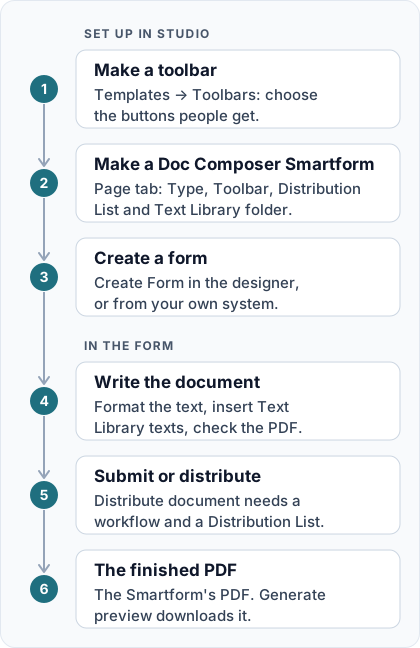
The Doc Composer turns a Smartform into a document editor. The person who fills in the form writes and formats the text with a toolbar above the form, inserts approved texts from the Studio Text Library, checks the PDF beside the form, and then submits or distributes the document.
How it works. In Studio, a toolbar template decides which buttons people get, and a Smartform becomes a Doc Composer when its Type is Doc Composer. Every form created from that Smartform opens with the toolbar above it. When the person is done, they submit the form or distribute it through a workflow, and the result is the Smartform’s PDF.
Who uses it
- Studio users with access to Templates create the toolbars and turn Smartforms into Doc Composer forms.
- The people who write the documents open a Doc Composer form from a link and work in the form itself, not in Studio.
The main parts
- Toolbar: a template under Templates → Toolbars that lists the buttons people get, for example formatting, Text Library, Split View and Distribute document.
- Doc Composer type: set on the Smartform’s Page tab, together with the Toolbar and the Distribution List.
- Rich Text fields: the fields people write in. Enable for user input must be ticked on each one.
- Text Library texts: texts marked Public that people can search for and insert.
- Split screen: the PDF of the form beside the text, so people can check the result while they write.
- Submit or Distribute document: how the person finishes. Distributing needs a workflow.
📝 Note: Editor Loader is a different Smartform type: when the form is submitted, the document opens in the Editor. It is not covered in this section.
In this section
- Set Up the Doc Composer: create a toolbar, make a Smartform a Doc Composer, offer Text Library texts and open a form.
- Using the Doc Composer: the editing screen, inserting texts, the PDF beside the form, and submitting or distributing.