Import and Export
Use a CSV file to add or change many texts at once, or to copy texts between companies.
Export
- In the Text Library, choose the environment in the list next to Export: Development, Test, Pre Production or Production.
- Click Export.
You get a CSV file with every text you have access to, as it is in the chosen environment. An export from Development contains the latest texts. An export from another environment contains the versions published there.
Import
- Click Import.
- Click Download the template if you start from scratch, or use a file you exported.
- Choose the file.
- Under Where the texts go, leave the field empty to put each row in the folder the file names, or pick one folder to put everything there.
- Click Check the file to see what will happen without changing anything.
- Click Import.
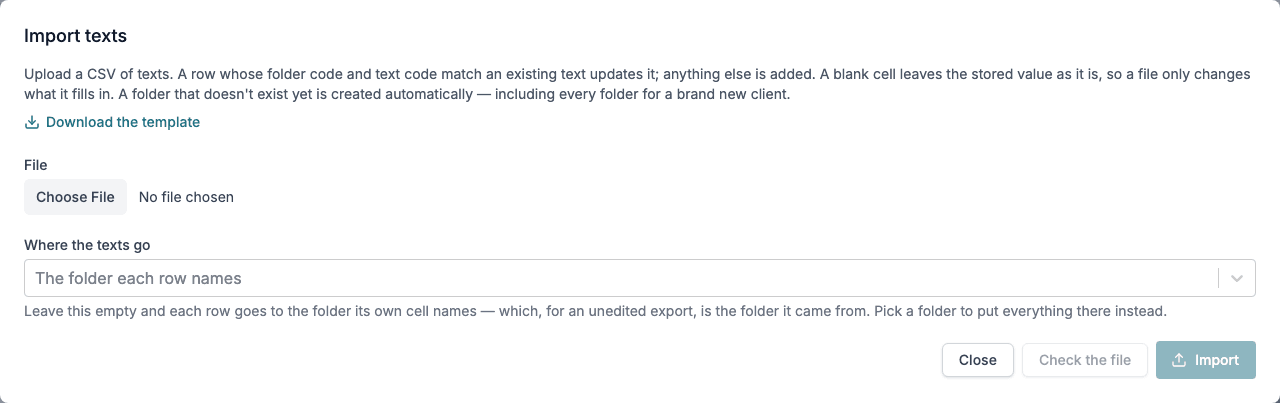
How rows are matched:
- A row whose folder code and text code match an existing text updates that text. Anything else is added.
- A blank cell keeps the value that is already stored, so a file only changes what it fills in.
- A folder that does not exist yet is created.
A file can be up to 10 MB and have up to 5,000 rows.
Imported texts land in Development. To use them in Test, Pre Production or Production, publish the folder. See Environments.
File layout
The first row holds the column names. Add one content: column per language.
folderCode,parentFolderCode,code,name,description,contentType,isPublic,defaultLanguage,content:en,content:no
HRDOCS,,sick-leave,Sick leave,Rules for reporting sick leave,plaintext,true,en,Report sick leave to your manager before 09:00 on the first day of absence.,Meld sykefravær til lederen din før kl. 09:00 første fraværsdag.- contentType is
plaintext,richtextorhtml. - isPublic is
trueorfalse. - parentFolderCode is only needed for a subfolder. Leave it empty for a top-level folder.
The template from Download the template always has the current columns. Use it when in doubt.