Page
The Page tab is used to configure the core settings of your Smartform.
These settings define how the Smartform is identified, stored, and processed.
Open the Page tab
- Go to the Design tab
- Select Page in the left panel
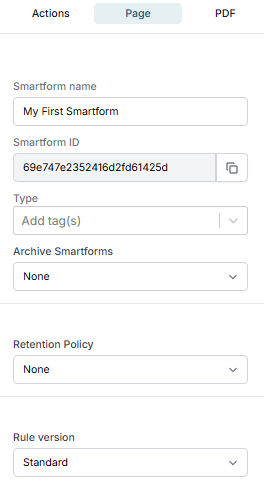
Page settings
| Field | Description |
|---|---|
| Smartform name | The name of the Smartform. Used for identification and display |
| Smartform ID | A unique ID for the Smartform. You can copy this value for reference |
| Type | Select the Smartform type: Doc Composer or Editor Loader. See Doc Composer |
| Toolbar | Shown when the type is Doc Composer. The toolbar template people get above the form. None gives every button |
| Distribution List | Shown when the type is Doc Composer. Submit lets people submit the form; a Distribution List lets them distribute it through a workflow. See Distribution Lists |
| Archive Smartforms | Choose where completed Smartforms should be stored |
| Retention Policy | Define how long Smartform data should be kept |
| Rule version | Select the rule version: Standard or Construction (deprecated) |
Typical usage
You usually configure the Page settings when:
- Creating a new Smartform
- Setting up storage and retention rules
- Preparing the Smartform for production
Tips
- Use clear and descriptive names for Smartforms
- Verify retention policies to meet company requirements
- Avoid using deprecated rule versions unless required