Log
The Log tab shows what has been added to, removed from or renamed in a Smartform, and who did it. Use it when you ask yourself when a field disappeared, or who changed the name of a section.
Open the Log
- Open the Smartform in the Design tab.
- Click Log in the editor header, next to Data and Warnings.
The pane shows Read Only at the left of the header, because you cannot change anything in the log.
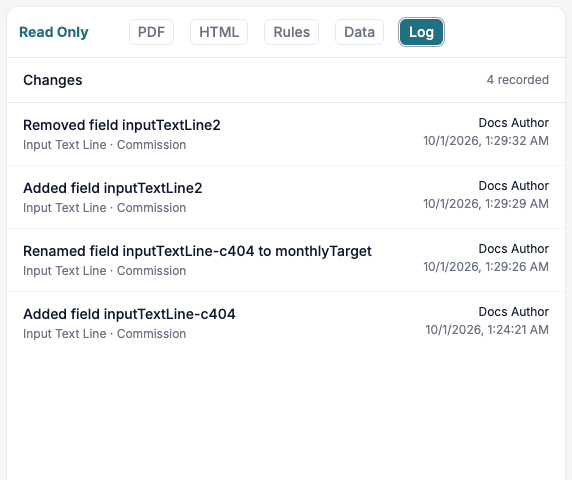
Above the list, Changes shows how many changes are recorded, for example 4 recorded.
What a row shows
Each row is one change.
- The first line says what happened: Added, Removed, Renamed or Copied, followed by the kind of item and its name. For example Added field inputTextLine2 or Renamed field inputTextLine-c404 to monthlyTarget.
- The second line gives the type of element and the section it is in, for example Input Text Line · Commission. Rows about a section, a row or a rule only name the item.
- The right side shows who made the change and when.
The log records changes to these items:
| Item | Shown as |
|---|---|
| Fields (elements) | field |
| Sections | section |
| Rows and columns | row, column |
| Rules and rule variables | rule, variable |
| Show/Hide rules | show/hide rule |
| Page template rules | page template rule |
When you copy a published version back to the draft, the log shows Copied a version to draft and names the environment it came from. See Smartform versions.
The newest change is at the top. The log shows 25 changes per page. Use Older and Newer at the bottom to move between the pages. The middle shows which page you are on, for example Page 1 of 2.
What is not in the log
The log keeps to changes that matter when you look for a cause. It does not record moving an item, changing its colours or text style, or changing the width of a column. A change that you make through the API is logged in the same way as a change in the designer.
A Smartform without any recorded changes shows No changes recorded for this form yet.. If the list cannot be loaded, the tab says The change log could not be loaded. and offers Try again.
The Log tab is shown for Smartforms. It is not shown when you edit a Smart Object or a Smartform template.
Related
- Warnings: renamed fields from Fix names show up here as Renamed rows.
- Smartform versions