Lookup, list and build functions
These functions work on tables and on JSON data. Use them in the Formula Editor. The text and date functions are on Data Transformation functions.
| Function | Returns |
|---|---|
| Sum, Avg, Min, Max | A number |
| arrayLookup | A list of rows |
| objectLookup | One row, or a value from a row |
| objectValueLookup | One row |
| jsonConstruct | An object |
| TableFilter | A list of rows |
| TableFlattenFilter | A flat list of rows |
| TableList | Text |
| DataTableBuild | A data table |
| TextLib | Text |
Each function has a reference in the editor. Type its name and open the reference to see the arguments and examples, and use Load example to try one.
Sum, Avg, Min, Max
What do these functions do?
They add up, average, or find the smallest or largest number in a column of a table.
Syntax
Sum({{table}}, "field")
Avg({{table}}, "field")
Min({{table}}, "field")
Max({{table}}, "field"){{table}}– The table variable."field"– The column to read. Leave it out when the list is a flat list of numbers.
Example
Sum({{Employees}}, "salary")If the table has the salaries 620000, 580000 and 640000, the result is 1840000.
Important
- Only numbers count. A value that is empty or not a number is skipped and is not counted as 0.
- Sum of an empty table is
0. Avg, Min and Max of an empty table, or of a column without numbers, give an empty result.
arrayLookup
What does this function do?
arrayLookup returns the rows of a table, or only the rows that match a filter.
Syntax
arrayLookup({{source}}, 'filterExpression'){{source}}– A table variable, or a path into the incoming data such as{{datatablevalues.basisObjectData.insurance.contract}}.'filterExpression'– Optional. One expression with the operators=,==,!=,>,<,>=and<=, joined withANDorOR. Put text values in double quotes and the whole filter in single quotes.
Examples
arrayLookup({{Contracts}}, 'contractStatus = "inForce"')With the contracts 126 (inForce) and 131 (expired), the result is the row for contract 126.
arrayLookup({{Contracts}}, 'contractStatus = "inForce" AND benefitType = "healthcare"')
arrayLookup({{Contracts}}, 'id >= 126')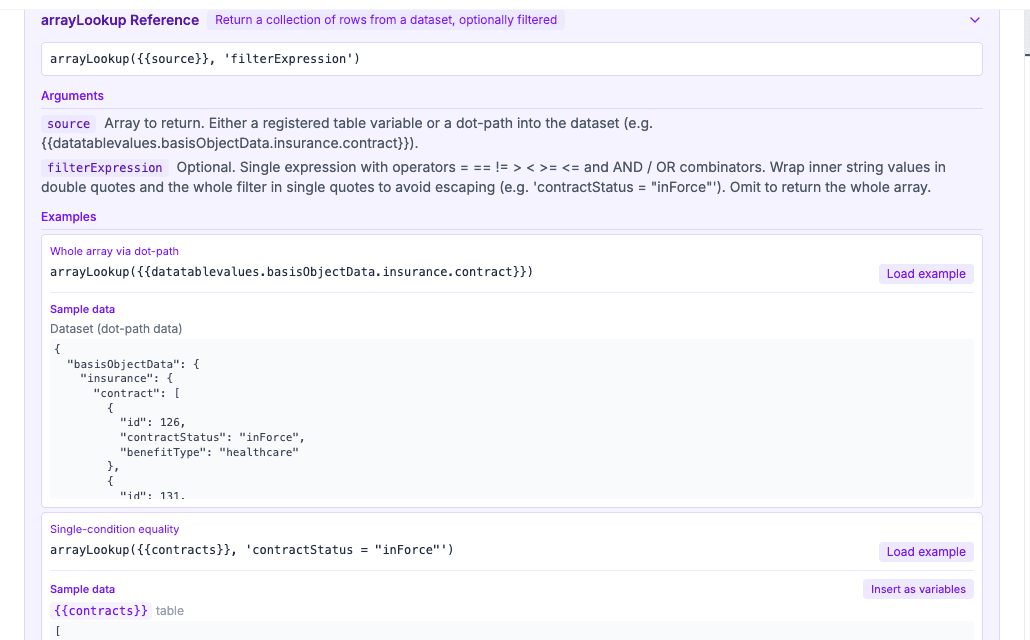
Important
- The result is always a list. It is empty when no row matches.
- Use Insert as variables on an example to create the sample table in your form.
objectLookup
What does this function do?
objectLookup finds one row in a table. It has three modes.
Syntax
objectLookup({{source}}, "filterField", "filterValue", {{reference}}, "key")| Mode | What you enter | Result |
|---|---|---|
| Filter and follow a reference | source, filterField, filterValue, reference and key | The row in reference whose id equals the key field of the matching row in source |
| Filter and read a field | source, filterField, filterValue, an empty "" for reference, and key | The value of the field key in the matching row |
| Find by id | Empty "" for filterField, filterValue and reference, and the id in key | The row in source whose id equals key |
Examples
objectLookup({{contractRole}}, "role", "insured", {{person}}, "person")If contractRole holds { "role": "insured", "person": "p1" } and person holds { "id": "p1", "name": "Kari Nordmann" }, the result is the row for Kari Nordmann.
objectLookup({{derivedInfo}}, "name", "GROUP_AGREEMENT.NAME", "", "value")
objectLookup({{postalAddress}}, "", "", "", "addr-001")
Important
- The result is empty when no row matches.
- The filter only tests for equality. Use TableFilter for other operators.
objectValueLookup
What does this function do?
objectValueLookup finds the first row of a table where any field you name equals a value.
Syntax
objectValueLookup({{lookupValueSource}}, "label", "lookupValue", {{reference}}, "matchField"){{lookupValueSource}}– A variable that holds the value to look up. Used whenlookupValueis empty."label"– A note about the value. It is not used when the formula runs."lookupValue"– The value to look up, as text or a variable. It takes precedence overlookupValueSource.{{reference}}– The table to search."matchField"– The field to compare. It can be any field, not onlyid.
Example
objectValueLookup({{unused}}, "company", "Nordlys Consulting AS", {{companies}}, "name")The result is the first row of companies whose name is Nordlys Consulting AS.
Important
- The result is empty when no row matches.
- Text is compared without regard to upper and lower case.
jsonConstruct
What does this function do?
jsonConstruct builds a nested object from a template.
Syntax
jsonConstruct('{ "key": "{{variable}}", "nested": { "field": "{{other.path}}" } }')- The template is JSON: keys and text values are in double quotes, and the whole template is in single quotes.
- A value that is only
"{{variable}}"keeps the type of the variable, so a table stays a table and an object stays an object. - A value that mixes text and a variable, such as
"Hello {{firstName}}", becomes text. - A path can use a position, such as
{{insurance[0].insuranceOfficialId}}.
Example
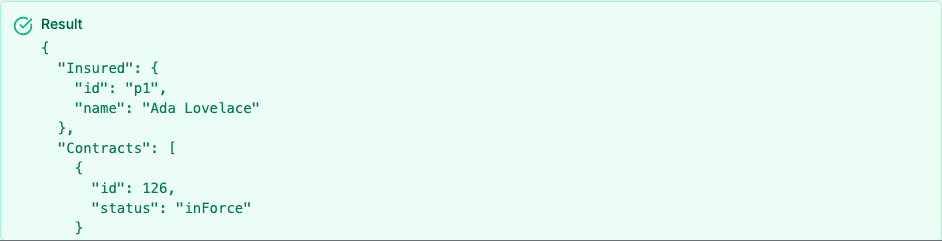
jsonConstruct('{ "Insured": "{{varInsured}}", "Contracts": "{{varActiveContracts}}" }')With varInsured = { "id": "p1", "name": "Ada Lovelace" } and one active contract, the result is an object with the insured and the list of contracts.
Important
- The result is an object. An invalid template gives an empty object.
TableFilter
What does this function do?
TableFilter keeps the rows where a column matches a value.
Syntax
TableFilter({{table}}, "field", "operator", value, "col1, col2")"operator"–equals,notequals,greaterthan,lessthan,greaterthanorequal,lessthanorequal,contains,notcontains,startswithorendswith.- The last argument is optional. It lists the columns to return.
Example
TableFilter({{people}}, "age", "greaterthan", 30)With Ada (36), Linus (24) and Grace (41), the result holds Ada and Grace.
TableFlattenFilter
What does this function do?
TableFlattenFilter walks through nested lists and returns one flat row for each inner item.
Syntax
TableFlattenFilter({{variable}}, "path[].to[].nested", "field1={value};field2={^parent.value}", "filter")- The path uses
[]for each list.arr[].obj.arr[]mixes objects and lists. - Each mapping is
name={field}. Use{field}for the current item,{^field}for its parent and{^^field}for the grandparent. - The filter is optional and can use
ANDandOR.
Example
TableFlattenFilter({{insurance}}, "contracts[]", "policy={^policyNo};benefit={benefitType}", "")For the policy POL-1 with the contracts healthcare and dental, and the policy POL-2 with travel, the result has three rows, each with its policy and benefit.
TableList
What does this function do?
TableList makes a numbered or bulleted list of the rows of a table.
Syntax
TableList({{table}}, "fields", "filter", "listType", "separator")"fields"– Column names separated by commas, or a template with{{column}}placeholders."filter"– Optional. Conditions such asstatus = "open", joined withANDorOR."listType"– Optional."numbered"(default),"bullets"or"none"."separator"– Optional."newline"(default) or"inline".
Example
TableList({{tasks}}, "{{title}} (due {{due}})", "", "bullets")DataTableBuild
What does this function do?
DataTableBuild builds a data table, a title and rows of labels and values, from JSON data. Use it to feed PDF and archive templates.
Syntax
DataTableBuild({{source}}, "path[]", 'template'){{source}}– A variable with the data."path[]"– The list to loop over. Use""for one table from the whole object.'template'– A JSON template in single quotes with{{field}}placeholders.$forEachloops over nested lists and$listmakes bullet lists.{{^field}}reads from the parent.
Example
DataTableBuild({{order}}, "", '{"title":"Order {{id}}","rows":[{"label":"Customer:","values":["{{customer}}"]}]}')TextLib
What does this function do?
TextLib returns a text from the Text Library.
Syntax
TextLib("folderCode", "textCode")"folderCode"– The code of the Text Library folder."textCode"– The code of the text.