Editable text (INPUT)
Editable text lets the person filling in a Smartform type a word, pick a value or choose a date straight inside a sentence you wrote, for example the first working day and the salary in an employment contract. You add it with an [[ INPUT : name ]] placeholder in the text of the Smartform. The answer is saved with the form under that name, can be repeated elsewhere with {{ name }}, and is printed in the PDF as part of the sentence.

How it works
This is the life of one answer, here the salary from the example above:
Add editable text
-
Open the Smartform in Studio and go to Design.
-
Click in the text of a Text or Headline element, or of a Rich Text element that does not have Enable for user input turned on.
-
Type
[[followed by a space. Studio suggests Editable text — typed by the person filling the form.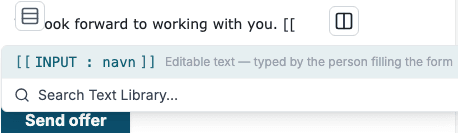
-
Pick the suggestion. Studio inserts
[[ INPUT : navn ]]. -
Replace
navnwith the name the answer is saved under, for exampleannualSalary. Use a name that no field in the form uses. -
Add options after a
|if you need them, for example[[ INPUT : annualSalary | default=650 000 ]].
Studio shows editable text in purple. Editable text does not work in labels or placeholders of fields; there the placeholder is shown as it is written.
Options
Write options after the name, each after a |, as option=value:
[[ INPUT : firstWorkingDay | type=date | format=dd.MM.yyyy ]]
[[ INPUT : employmentType | type=select | source=permanent:Permanent,temporary:Temporary,trainee:Trainee ]]
[[ INPUT : annualSalary | default=650 000 ]]
[[ INPUT : contactPerson | default=$ManagerName ]]| Option | Values | What it does |
|---|---|---|
type | text (default), date or select | text is a free text field inside the sentence, date a date picker and select a dropdown list. Any other value is treated as text. |
format | For example dd.MM.yyyy | For type=date: how the date is printed. The default is yyyy-MM-dd. Use only the letters d, M, y, H, h, m and s; with any other letter the date is printed as yyyy-MM-dd. |
default | Text, or $ and a name | The value filled in until the person changes it. With $, for example default=$ManagerName, the value comes from the answer to another editable text with that name, or else from the data table value with that name. |
source | A list, or a name | For type=select: the options. Write them as value:Display text pairs separated by commas, for example source=permanent:Permanent,temporary:Temporary. Instead of a list you can give the name of a value, sent with the form, that holds the options as JSON: [{"value": "permanent", "display": "Permanent"}]. |
Rules for option values:
- An option value cannot contain
|or]. So you cannot put a placeholder inside an option: writedefault=$ManagerName, notdefault=[[ ManagerName ]]. - In a
sourcelist, a value or display text cannot contain:or,. - A list with one option and no display text reads as a name. Add a comma to make it a list:
source=legal,. [[ INPUT ]]or[[ INPUT : ]]without a name is not editable text; it is shown as written.
📝 Note: Older Smartforms can use
defaultDataTableValue=name. It still works, but usedefault=$namein new texts.
What the person filling in sees
- Text: a line to type on inside the sentence. The name shows in grey until they type. A line break they type or paste becomes a space.
- Date: a date picker. The date is saved as
yyyy-MM-ddand printed in theformatyou chose. - Select: a dropdown list with your options. The name shows until they pick one.
- Default: filled in and saved as the answer when the form opens. If the person clears it, it stays empty.
- Steps: in a Smartform with steps, only the person whose step contains the text can fill it in. In other steps, and once the form is completed, it shows as plain text.
Studio’s preview shows the default, or the name where there is no default, in place of each field:

Using the answer
-
On the form:
{{ annualSalary }}shows the answer anywhere else in the form, and updates while the person types. See Variables and placeholders. -
In the PDF: the answer is printed inside the sentence. A date is printed in its
formatand a select shows the display text of the chosen option. An empty answer prints nothing.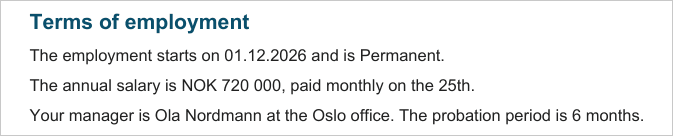
-
Through the REST API: fetch the form with
readableValues=true. The answers are invalues.inlineInputs, as they are printed. See Reading a form back. -
Filled in by your system: when you create the form through the REST API, send an answer in
valuesunder the name of the editable text, for example"values": { "annualSalary": "700 000" }. See REST API.
Warnings
The Warnings tab of the designer lists editable text that can be misread. The Smartform can still be published.
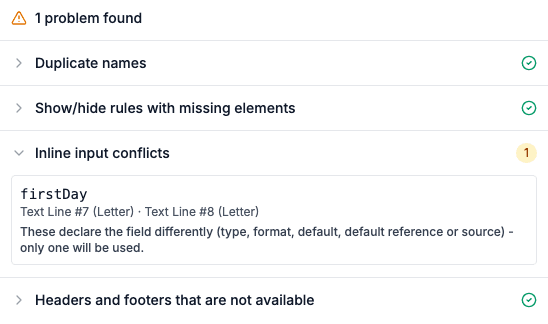
- The same name with different options. Using the same name twice is fine when both places are written the same way; they share one answer. When the
type,format,defaultorsourcediffer, only one of them is used. Write them the same way. - The same name as a field. A field and an editable text with the same name share one saved answer. Rename one of them.
- The same name as a Rules variable. The two are saved separately, so a reader cannot tell which one a placeholder means. Rename one of them.