Versions
Studio saves your work on a Smartform automatically while you edit. Those changes stay a draft until you click Publish in the designer. Publish makes your changes live in Development and keeps them as a new version. From Development, you move a Smartform on to Test, Pre Production and Production. See Deployment.
The Versions tab
Open a Smartform and click the Versions tab. Smartform Versions lists the version that each environment uses.
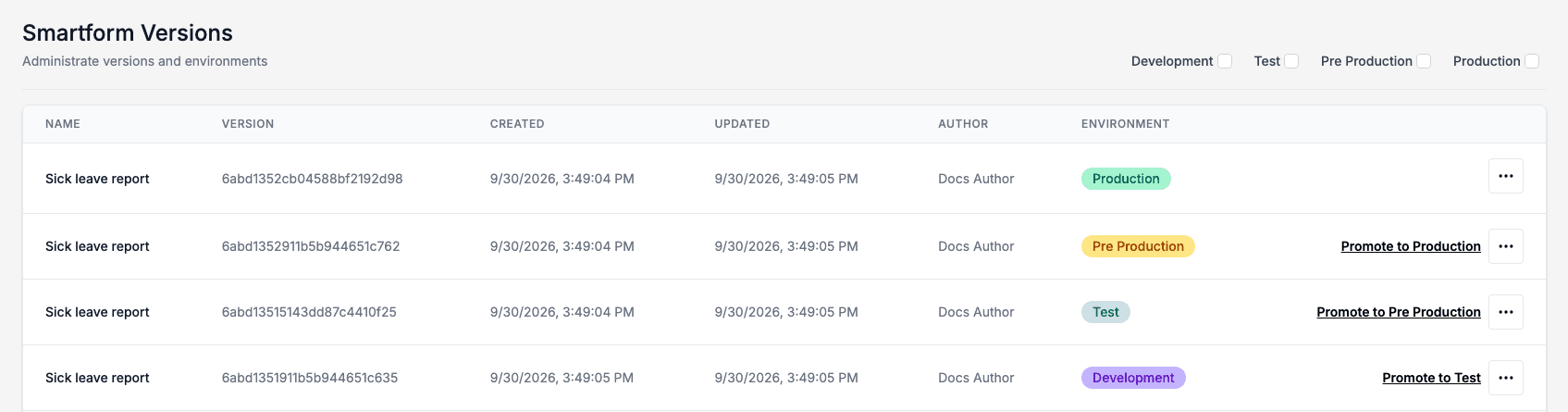
- Environment shows where the version is. The version an environment uses has a coloured badge.
- Tick Development, Test, Pre Production or Production in the top right to also show the older versions of that environment.
- Click a version’s name to preview it.
Promote a version
Promote to and the next environment moves a version one environment further. It is shown on the version each environment uses, except in Production.
- Click Promote to Test (or Promote to Pre Production, Promote to Production) on the row.
- Studio asks Promote this version from Development to Test?. Click Confirm.

This does the same as Publish on the Deployment pages. An inactive Smartform can’t be promoted. See Publish Smartforms.
More actions
The actions button at the end of a row offers:
- Preview shows the version.
- Download saves the version as a JSON file.
- Rollback undoes the newest version of an environment. It is shown on the version each environment uses. In Development it is only shown when there is an earlier Development version to go back to.
- Copy to draft copies the version into the designer as an unpublished draft. Nothing is published.
What a rollback does depends on the environment. In Development, the version before becomes live again and your current design stays as a draft, so the next Publish publishes it again. In the other environments, the newest version there is removed. See Versions, Rollback and Audit.